These docs are for v1. Click to read the latest docs for v3.

Add Recipient

Add a new recipient or update an existing recipient for a customer

👍

PUT

/customers/:customer_id_type::customer_id/recipients/:recipients_id_type::id

eg: /customers/mobile_number:9876543210/recipients/acc_ifsc:61046336411_sbin0000001

📘

Note - The maximum recipient addition limit in a day is 5
Path Params
string
required
Defaults to mobile_number

Fixed type for remittance

int32
required

id of the customer; currently only mobile number of the customer can be used

string
required

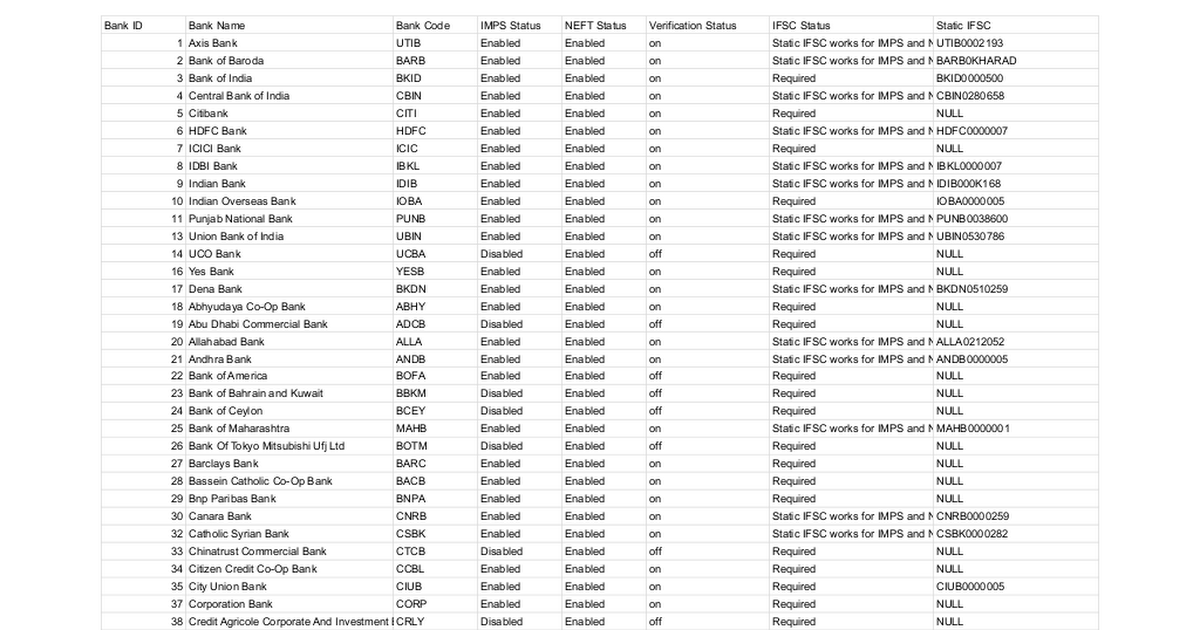
recipient_id_type can have the following parameters: a) acc_ifsc b) acc_bankcode (only applicable when IMPS service is available and IFSC is not required). For bankcode refer to bank list attached below

string
required

This should be the value according to the recipient_id_type format.

Form Data
int32
required

The unique cell number with which you are onboarded on Eko's platform. For UAT refer to [Platform Credentials] (https://developers.eko.in/docs/platform-credentials)

int32
required

a unique id for each bank has been allocated and that has to passed here. Refer to the bank list attached below

string
required

name of the recipient

int32
required

Valid mobile number of the recipient

int32
required
Defaults to 3

value will be 3

string
required

User code value of the retailer from whom the request is coming

Headers
string
required

Your unique API key that will authenticate your request. For UAT, refer to [Platform Credentials] (https://developers.eko.in/docs/platform-credentials)

string
required

Refer to [authentication section] (https://developers.eko.in/docs/authentication)

string
required

Refer to [authentication section] (https://developers.eko.in/docs/authentication)

Response

Language
LoadingLoading…
Response
Choose an example:
application/json