
One of the prime use cases of this API is Cash-out. Developers can create a solution around this where the amount can be withdrawn using a biometric device.
List of banks available with bank ids and bank codes is available in the following Google Excel sheet:

Header parameter request_hash generation process
First, the secret-key value which you have passed "d2fe1d99-6298-4af2-8cc5-d97dcf46df30"; is not a value of secret-key this is the key which is encoded to generate the secret-key and secret-key-timestamp.
Please generate the request hash properly. Please check the request hash generation code again. Before generating the request hash you need to generate a string which will be generated by concatenating some parameters in a particular manner only. You cannot change the sequence.
Sequence of concatenated string:
secret-key-timestamp + aadhaar + amount + user_code
Note : Unencrypted value of aadhaar number will be passed in the concatenated string and amount must be passed as 0 in case of balance inquiry / mini statement
After generating the concatenated string please follow the following procedure :
- Encode your authenticator password using the base 64. Authenticator password will be the key which you have used for the secret-key generation. Authenticator password for the staging server is "d2fe1d99-6298-4af2-8cc5-d97dcf46df30"
// Initializing key in some variable. You will receive this key from Eko via email
$key = "d2fe1d99-6298-4af2-8cc5-d97dcf46df30";
$encodedKey = base64_encode($key);
After encoding the key, you need to hmac the concatenated string and encoded_key using hmac256.
$signature_req_hash = hash_hmac('SHA256', $data, $encodedKey, true);
In the $data you need to send the concatenated string.After hmac , you need to again encode the result using the base64.
$request_hash = base64_encode($signature_req_hash);Final result after encoding will be the request_hash.
Please make sure that you are generating the request_hash in this manner only.
Encryption process for aadhaar parameter:
- Decode public key using base64 encoding technique
- Compute RSA encrypted signature using decoded key and message.
- Encode encrypted signature with base64 encoding to send message on API
Public key for aadhar encryption (PRODUCTION) -
MIGfMA0GCSqGSIb3DQEBAQUAA4GNADCBiQKBgQCaFyrzeDhMaFLx+LZUNOOO14Pj9aPfr+1WOanDgDHxo9NekENYcWUftM9Y17ul2pXr3bqw0GCh4uxNoTQ5cTH4buI42LI8ibMaf7Kppq9MzdzI9/7pOffgdSn+P8J64CJAk3VrVswVgfy8lABt7fL8R6XReI9x8ewwKHhCRTwBgQIDAQAB
Note:
If the merchant/retailer is not onboarded on Eko's system is not allowed to do the transaction. They need to enroll themselves followed by the service activation. Kindly refer to the section Agent Management API.
import java.security.KeyFactory;
import java.security.PublicKey;
import java.security.spec.X509EncodedKeySpec;
import java.util.Base64;
import javax.crypto.Cipher;

public class RSAEncryption {

    public static void main(String[] args) {
        try {
            String publicKeyPEM = "MIGfMA0GCSqGSIb3DQEBAQUAA4GNADCBiQKBgQCaFyrzeDhMaFLx+LZUNOOO14Pj9aPfr+1WOanDgDHxo9NekENYcWUftM9Y17ul2pXr3bqw0GCh4uxNoTQ5cTH4buI42LI8ibMaf7Kppq9MzdzI9/7pOffgdSn+P8J64CJAk3VrVswVgfy8lABt7fL8R6XReI9x8ewwKHhCRTwBgQIDAQAB";

            // Decode public key
            byte[] publicKeyBytes = Base64.getDecoder().decode(publicKeyPEM);
            X509EncodedKeySpec keySpec = new X509EncodedKeySpec(publicKeyBytes);
            KeyFactory keyFactory = KeyFactory.getInstance("RSA");
            PublicKey publicKey = keyFactory.generatePublic(keySpec);

            // Aadhar number to be encrypted
            String aadharNo = "123456789012"; // Replace with your Aadhar number

            // Encrypt Aadhar number using public key
            Cipher cipher = Cipher.getInstance("RSA/ECB/PKCS1Padding");
            cipher.init(Cipher.ENCRYPT_MODE, publicKey);
            byte[] encryptedBytes = cipher.doFinal(aadharNo.getBytes("UTF-8"));
            String encryptedAadhar = Base64.getEncoder().encodeToString(encryptedBytes);

            System.out.println("Encrypted Aadhar: " + encryptedAadhar);

        } catch (Exception e) {
            e.printStackTrace();
        }
    }
}
<?php

// Public key
$public_key = 'MIGfMA0GCSqGSIb3DQEBAQUAA4GNADCBiQKBgQCaFyrzeDhMaFLx+LZUNOOO14Pj9aPfr+1WOanDgDHxo9NekENYcWUftM9Y17ul2pXr3bqw0GCh4uxNoTQ5cTH4buI42LI8ibMaf7Kppq9MzdzI9/7pOffgdSn+P8J64CJAk3VrVswVgfy8lABt7fL8R6XReI9x8ewwKHhCRTwBgQIDAQAB';

// Aadhar number to be encrypted
$aadhar_no = '123456789012';  // Replace with your Aadhar number

// Decode public key and create a key object
$public_key_obj = openssl_pkey_get_public("-----BEGIN PUBLIC KEY-----\n" . chunk_split($public_key, 64, "\n") . "-----END PUBLIC KEY-----");

if ($public_key_obj === false) {
	die('Public key loading failed');
}

// Encrypt Aadhar number using public key
openssl_public_encrypt($aadhar_no, $encrypted_aadhar, $public_key_obj);

// Base64 encode the encrypted Aadhar number
$encoded_encrypted_aadhar = base64_encode($encrypted_aadhar);

echo "Encrypted Aadhar: $encoded_encrypted_aadhar\n";

?>
using Org.BouncyCastle.Crypto;
using Org.BouncyCastle.Crypto.Parameters;
using Org.BouncyCastle.Security;
using System.Security.Cryptography;

 #region Aadhar Encryption Process
                        try
                        {
                            var keyBytes = Convert.FromBase64String("MIGfMA0GCSqGSIb3DQEBAQUAA4GNADCBiQKBgQCXa63O/UXt5S0Vi8DM/PWF4yugx2OcTVbcFPLfXmLm9ClEVJcRuBr7UDHjJ6gZgG/qcVez5r6AfsYl2PtKmYP3mQdbR/BjVOjnrRooXxwyio6DFk4hTTM8fqQGWWNm6XN5XsPK5+qD5Ic/L0vGrS5nMWDwjRt59gzgNMNMpjheBQIDAQAB
");
                            AsymmetricKeyParameter asymmetricKeyParameter = PublicKeyFactory.CreateKey(keyBytes);
                            RsaKeyParameters rsaKeyParameters = (RsaKeyParameters)asymmetricKeyParameter;
                            RSAParameters rsaParameters = new RSAParameters();
                            rsaParameters.Modulus = rsaKeyParameters.Modulus.ToByteArrayUnsigned();
                            rsaParameters.Exponent = rsaKeyParameters.Exponent.ToByteArrayUnsigned();
                            RSACryptoServiceProvider rsa = new RSACryptoServiceProvider();
                            rsa.ImportParameters(rsaParameters);

                            byte[] plaintext = Encoding.UTF8.GetBytes(ObjRequest.AadharNo);
                            byte[] ciphertext = rsa.Encrypt(plaintext, false);
                            string cipherresult = Convert.ToBase64String(ciphertext);
                            ObjRequestData.aadhar = cipherresult;
                        }
                        catch (Exception ex)
                        { }
#endregion
from Crypto.PublicKey import RSA
from Crypto.Cipher import PKCS1_v1_5
import base64

public_key = 'MIGfMA0GCSqGSIb3DQEBAQUAA4GNADCBiQKBgQCaFyrzeDhMaFLx+LZUNOOO14Pj9aPfr+1WOanDgDHxo9NekENYcWUftM9Y17ul2pXr3bqw0GCh4uxNoTQ5cTH4buI42LI8ibMaf7Kppq9MzdzI9/7pOffgdSn+P8J64CJAk3VrVswVgfy8lABt7fL8R6XReI9x8ewwKHhCRTwBgQIDAQAB'

# Decode public key and create a key object
public_key_bytes = base64.b64decode(public_key)
public_key_obj = RSA.import_key(public_key_bytes)

# Aadhar number to be encrypted
aadhar_no = '123456789012'  # Replace with your Aadhar number

# Encrypt Aadhar number using public key
cipher = PKCS1_v1_5.new(public_key_obj)
signature = cipher.encrypt(aadhar_no.encode())
encrypted_aadhar = base64.b64encode(signature).decode()

print(f"Encrypted Aadhar: {encrypted_aadhar}")
Note:
Above mentioned codes are the sample and running codes provided by our partners, any changes done needs to checked from your end
/**
 * Sample Function to capture fingerprint from RDService based biometric device in the browser (using JQuery).
 *
 * @param {string} capture_url RDService URL to call for capture. Eg: http://127.0.0.1:11100/capture or http://127.0.0.1:11100/rd/capture
 * @param {function} callbackFunction The function to call back on capture success or failure
 *
 * @return {Object} response Object containing the response details.
 * @return {boolean} response.httpSuccess Whether AJAX request successful.
 * @return {boolean} response.captureSuccess Whether fingerprint capturing successful.
 * @return {number} response.captureQuality Quality of fingerprint scan if captureSuccess is true.
 * @return {number} response.errCode Error code returned by RDService if captureSuccess is false.
 * @return {string} response.errInfo Error details returned by RDService if captureSuccess is false.
 * @return {string} response.textStatus HTTP status if httpSuccess is false.
 * @return {string} response.errorThrown Error details if httpSuccess is false.
 */
function capturefingerprint(capture_url, callbackFunction) {

	var doc = document.implementation.createDocument("", "", null);
	var pidOptionsElem = doc.createElement("PidOptions");
	var optsElem = doc.createElement("Opts");

	optsElem.setAttribute("fCount", 1);
	optsElem.setAttribute("fType", 2);
	optsElem.setAttribute("iCount", 0);
	optsElem.setAttribute("pCount", 0);
	optsElem.setAttribute("format", 0);
	optsElem.setAttribute("pidVer", "2.0");
	optsElem.setAttribute("timeout", 10000);
	optsElem.setAttribute("posh", "UNKNOWN");
	optsElem.setAttribute("env", "P");
  optsElem.setAttribute("wadh", "E0jzJ/P8UopUHAieZn8CKqS4WPMi5ZSYXgfnlfkWjrc=");


	pidOptionsElem.appendChild(optsElem);
	doc.appendChild(pidOptionsElem);

	$.ajax({
		url: capture_url,
		type: 'CAPTURE',
		data: doc,
		processData: false,
		success: function (response) {
			var doc2;
			var result = {
				httpSuccess: true
			};

			if (typeof response === 'string') {
				doc2 = (new DOMParser()).parseFromString(response, 'text/xml');
				result.pid_data = response;
			} else {
				doc2 = response;
				result.pid_data = (new XMLSerializer()).serializeToString(response);
			}

			var resp = doc2.getElementsByTagName("Resp");
			result.errCode = resp[0].getAttribute('errCode');

			if (errCode != 0) {
				result.captureSuccess = false;
				result.errInfo = resp[0].getAttribute('errInfo');
			} else {
				result.captureSuccess = true;
				result.captureQuality = parseInt(resp[0].getAttribute('qScore'));
			}

			callbackFunction(result);
		},

		error: function (jqXHR, textStatus, errorThrown) {
			callbackFunction({
				httpSuccess: false,
				captureSuccess: false,
				textStatus: textStatus,
				errorThrown: errorThrown
			});
		}
	});
}
Sample PidData after serialization
<PidData>
	<Data type=\\\"X\\\">MjAyMS0xMi0wNlQwNjo0ODoyM51MswAVy/PSZSqgXRudRMXTP356NsUJ4q4qItIZDjYZfOD4zwDpqlKT4aU927NvMJm6+IxgTTZEFngZ0TY+ibqUeQQiB7JEwj+8xeeO+7Y+G4yJmL7FjqNfQG7O/AgMP8AXWFS522iUeGmqkyf7InpXIj7VCiKlNDu+QNu+donxOQ6hRlNJ5J0kc082Fct4hvEr4iFVL9UrAx1+kR8yDbLAISxc+37RI7cxn577uNsazb/jy7O+tTk9zE6Ia3uPY0uqKfMNqNhSTomHMeJo5S0wuOW7uyRYrvz8Q4hUlCuqsup0ZmKA5su1F7HU60q6DHkO0eH+mk8Q/gA8ymaEHeBadkd+i/8tTZnxDyp/gw+z3vT+MPZNLKT4WAE5w2nhOoOOS+F9NPpJ2mn+FqwkRQ7VnEv09g0/bTyAZHCvmhUAy/NHYVYEPaycRpoSIzGuA3REoX++HaOetubgBx9vVVIl5ZKAR4hlwzuGJbcFlyJh6uxjQIK1bJh/jPJH/m+WyJpZwc99IArg9hnBkUFTO42ZeaHXj7+4BNDahs6vFtoquJGFXHYkZUZ866itGA6Dh8iJCjIjd8f6IEah1U+SKX0mkAzh4IM91lw6sIeNpykMwk99FTDJ33vkW+ao1mf/LK8yWV3hisEGqQtCAhn3S71lpf/pJk4TOVLIJKwqnlcsin6mWcLr3Ve8xkWvJW8dRVfZ+KbQTpdOU4oQs3iv4jl0ORbuJJhVC2IEOGpUfpQyS8OO0x8D7RTvl+L3FmtKIXNZ7qlfkYdxKnH3a0QSvFY8KFpxOhUKcQXqIWU/Yuhtldgjb6D2Ys2QvgR99kRhDF7449fbqkQnnNF8uIGX3MIailsw/JFcTiko22s6in6gzPuv7AoPl1XIfDURnvQQnxlGb3MArO2rD48SVmNpwYGBnGTTyV1OYl9EbrJ1NPVcoXFCt6tcDDXwnhB09iJK7PWmKuIe5wP8dGWK/kgdYuEYRmsso+niYg2zUwdt41JGFPVJR0eCwNCOcmQ2uocPGmukB3h0h6dR1mMCTYBPUyNIxQznMxGAj72N0yHXwCS5FR6Qih8sYTDA/x1OOnuANK/m7CuCJ6H+tv48PU6vubtQAfxKCXQMiUZp0qbc</Data>
	<DeviceInfo dc=\\\"79bfab62-5fd1-4ea1-bf5c-00cc714ae571\\\" dpId=\\\"MANTRA.MSIPL\\\" mc=\\\"MIIEGjCCAwKgAwIBAgIGAX0iDKcNMA0GCSqGSIb3DQEBCwUAMIHqMSowKAYDVQQDEyFEUyBNYW50cmEgU29mdGVjaCBJbmRpYSBQdnQgTHRkIDcxQzBBBgNVBDMTOkIgMjAzIFNoYXBhdGggSGV4YSBvcHBvc2l0ZSBHdWphcmF0IEhpZ2ggQ291cnQgUyBHIEhpZ2h3YXkxEjAQBgNVBAkTCUFobWVkYWJhZDEQMA4GA1UECBMHR3VqYXJhdDEdMBsGA1UECxMUVGVjaG5pY2FsIERlcGFydG1lbnQxJTAjBgNVBAoTHE1hbnRyYSBTb2Z0ZWNoIEluZGlhIFB2dCBMdGQxCzAJBgNVBAYTAklOMB4XDTIxMTEyNTEyMjEzNVoXDTIxMTIxNTA1MjMxMlowgbAxJTAjBgNVBAMTHE1hbnRyYSBTb2Z0ZWNoIEluZGlhIFB2dCBMdGQxHjAcBgNVBAsTFUJpb21ldHJpYyBNYW51ZmFjdHVyZTEOMAwGA1UEChMFTVNJUEwxEjAQBgNVBAcTCUFITUVEQUJBRDEQMA4GA1UECBMHR1VKQVJBVDELMAkGA1UEBhMCSU4xJDAiBgkqhkiG9w0BCQEWFXN1cHBvcnRAbWFudHJhdGVjLmNvbTCCASIwDQYJKoZIhvcNAQEBBQADggEPADCCAQoCggEBALwP8kOTVlcHl1sOaXo3e1DLJJMRdrfrVOsAsgkrZQNnppVB8c9hY0OPP9ncWNl7SMobrrA6k2lSI0RDd1/4vd11ZUlic/IaHkNJQ6XJHE+Cwl8r2zVlAIO/cyibm7oPZRuf6TFzwrxltxuRL9J81lT/bm53injV8Six7Zg0pYqoJ1kwXqxF3ql+T3SCDp9zUfohwC60X3lFnqxOLgrIH430exaSsRl1UjnaDbU71ihme1yXDeVkKaQNIlTXbj1RJNXeHJpJMEpDyld54oHTmvSIsZip/QmT8rzUHcRjuois71J4ZLV836AyncYBvWqfdr4ETJ3DpSIA1gLw8w8lpw8CAwEAATANBgkqhkiG9w0BAQsFAAOCAQEAG+TPUnji6Ziyge9bIr9fEQ/4rnB2JaJXrnUxkuL3WG/vpCHBwWuSw67nHo4CzQx7XUgrA8sWZPnL1JFViWaFN1kKy/4veUtuMF12gBDwAs9egUDqb1jijcg7V9gv6aegftq0cXH6mU6qhUCtDm8Q5jMBn2v3FpQBXcTNZa4jWUDy2TkrKwssMlBFB3Jz+k2rMe1jsFc0ZoFyCmAqU7Vb80tRO0/RC4zjmO3YQXpUYjxd6frh3LRSl6626P6Qpf/szX4bpZp3s4Kuf1J/M7wF2/pcQfcoypXPv3iDlaqOU3VbjOgNCj3OHmJjabmin0mFbwN08pFNthFGvv8Xxe6Hkw==\\\" mi=\\\"MFS100\\\" rdsId=\\\"MANTRA.AND.001\\\" rdsVer=\\\"1.0.5\\\">
		<additional_info>
			<Param name=\\\"srno\\\" value=\\\"2174371\\\"/>
			<Param name=\\\"sysid\\\" value=\\\"356922093643968\\\"/>
			<Param name=\\\"ts\\\" value=\\\"2021-12-06T06:48:25+05:30\\\"/>
		</additional_info>
	</DeviceInfo>
	<Hmac>fTun00oL2ZVMzDRTWVcQA2mCbD6lk9JHLaBtOM3YiNrXUDvVdmemY9WplASeCJ8Z</Hmac>
	<Resp errCode=\\\"0\\\" errInfo=\\\"Capture Success\\\" fCount=\\\"1\\\" fType=\\\"0\\\" iCount=\\\"0\\\" iType=\\\"0\\\" nmPoints=\\\"35\\\" pCount=\\\"0\\\" pType=\\\"0\\\" qScore=\\\"83\\\"/>
	<Skey ci=\\\"20221021\\\">agdti+4wZR9bKRVEHGMknQRUqTiFbloF4HoY7ko1GoVTj7uDMklfgkS1C/NljxJgnYyPY3TRjpvBHtOOuYKxbN/nD1zZxKcGokwENOIyAU6Ac+jm+iqeuNA7AWS/l/fDNs+70pRNg5ZeVh5eDQ8p6mDnPxyu0V7YanOfyD8PDim3YgXiI2Isg4NFJAsY8vGAKBygp6+L7lg8vu9QPFS5vin1KE0eAUyruhrsoNl8r1a0O2tQUssra+JO4aqdjIlgtp+Xlgx9sot43UpCa7HVdF+ASJXojptQYaC6yAoZj9HgrBQm2SmV6U/5J5krcr/75LBxPKQumuiuh+3WktTdnQ==</Skey>
</PidData>
Things to consider for PidData
The PidData should contain Data type="X" (for XML). If this comes as P (for Protobuf), make sure you send pid format as 0 when sending a capture request.
The PidData should contain DeviceInfo with a mc parameter. The mc parameter is the device public key certificate signed by Device Provider Key (To verify your certificate, visit https://www.sslshopper.com/certificate-decoder.html).
For more details, refer Section 2.3 PID Creation – Signing and Encrypting Biometrics from UIDAI guidelines.
https://uidai.gov.in/images/resource/aadhaar_registered_devices_2_0_09112016.pdf
Update value of fType parameter from 0 to 2
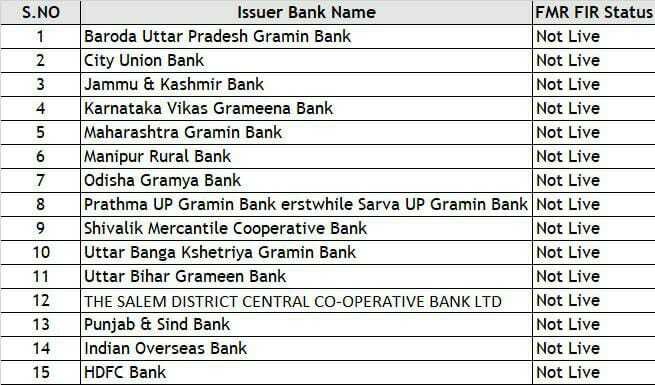
As per the strict guidelines of NPCI on 'FIR-FMR single PID block implementation in Aadhar-based biometric authentication. We need to capture the fingerprint data of our end-user with an updated PID fType value. In order to do that Frontend code which is responsible to capture finger data, needs to pass value of fType = 2 rather than 0; this will return PID XML with the updated fingerprint data format and Same can be passed over in Eko's API. Please refer the updated sample code snippet of capture fingerprint code.
The list of banks are not live with the FMR+FIR and hence the value of fType =0 instead of 2 for the mentioned banks.
Transaction types
Following are the parameters for different transaction types:
- service_type=2 (Cash Withdrawal)
- service_type=3 (Balance Inquiry)
- service_type=4 (Mini Statement)
- service_type=5 (Aadhaar Pay)